> For the complete documentation index, see [llms.txt](https://efplus.gitbook.io/user-guides/llms.txt). Markdown versions of documentation pages are available by appending `.md` to page URLs; this page is available as [Markdown](https://efplus.gitbook.io/user-guides/english/how-to-purchase-nfts.md).
# How to Purchase NFTs
Version 1 (3 June 2025)
### **Step 1 - Go to**[ **efplus.world/login**](https://efplus.world/login) **and login to your account.**
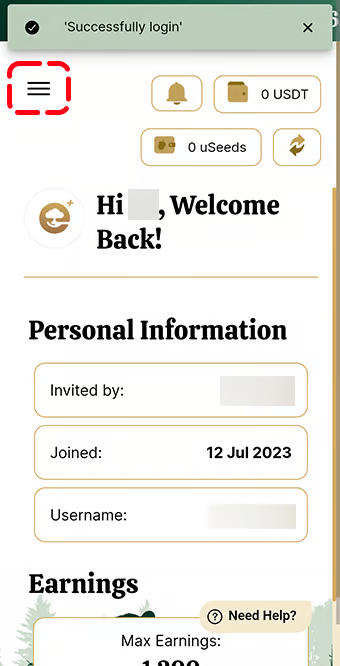
### Step 2 - Tap on the 3 horizontal lines **at the top-left corner.**
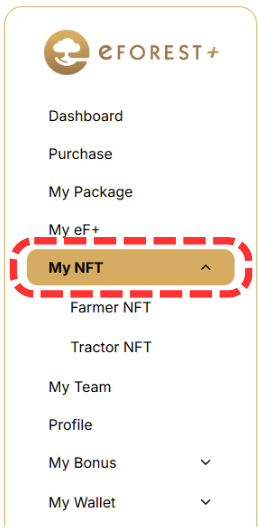
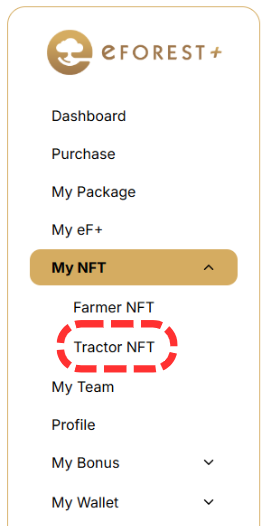
### Step 3 - Tap on *‘My NFT’* on the dashboard panel.
### Step 4 - Tap on the NFT you would like to purchase.
### Step 5 - Tap on the *“Buy Farmer/Tractor NFT”*.

### Step 6 - Tap on the preferred version of the NFT, then tap on *“Submit”* and proceed to payment, choosing your preferred payment method.

### Step 7 - Based on which NFT you purchased, you will receive your NFT in their respective tabs.

## Linking the *Farmer NFT* to your tree. (Not applicable for Tractor NFT)
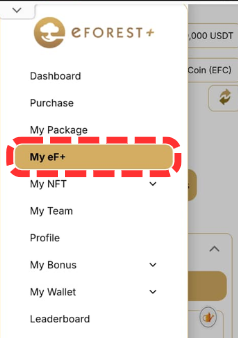
### Step 8 - Go to your Dashboard Panel and tap on *“My eF+”*
### Step 9 - Tap on *“Link Farmer NFT”*

### Step 10 - Choose the specific *Farmer* you would like to link with the Plant.

### Step 11 - Your Tree now has the following bonus effect.

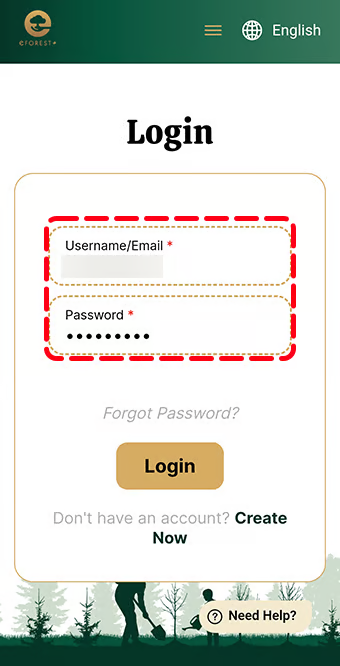 ### Step 2 - Tap on the 3 horizontal lines **at the top-left corner.**
 ### Step 3 - Tap on *‘My NFT’* on the dashboard panel.
 ### Step 4 - Tap on the NFT you would like to purchase.
 ### Step 5 - Tap on the *“Buy Farmer/Tractor NFT”*.

### Step 6 - Tap on the preferred version of the NFT, then tap on *“Submit”* and proceed to payment, choosing your preferred payment method.

### Step 7 - Based on which NFT you purchased, you will receive your NFT in their respective tabs.

## Linking the *Farmer NFT* to your tree. (Not applicable for Tractor NFT)
### Step 8 - Go to your Dashboard Panel and tap on *“My eF+”*
### Step 5 - Tap on the *“Buy Farmer/Tractor NFT”*.

### Step 6 - Tap on the preferred version of the NFT, then tap on *“Submit”* and proceed to payment, choosing your preferred payment method.

### Step 7 - Based on which NFT you purchased, you will receive your NFT in their respective tabs.

## Linking the *Farmer NFT* to your tree. (Not applicable for Tractor NFT)
### Step 8 - Go to your Dashboard Panel and tap on *“My eF+”*